Better Changes
A Git panel for Herdr Desktop that looks like Herdr's own panels: file changes, staging, commits and history in a right sidebar, with diffs in the centre. For anyone who wants to check and commit what their agents changed without leaving Herdr.
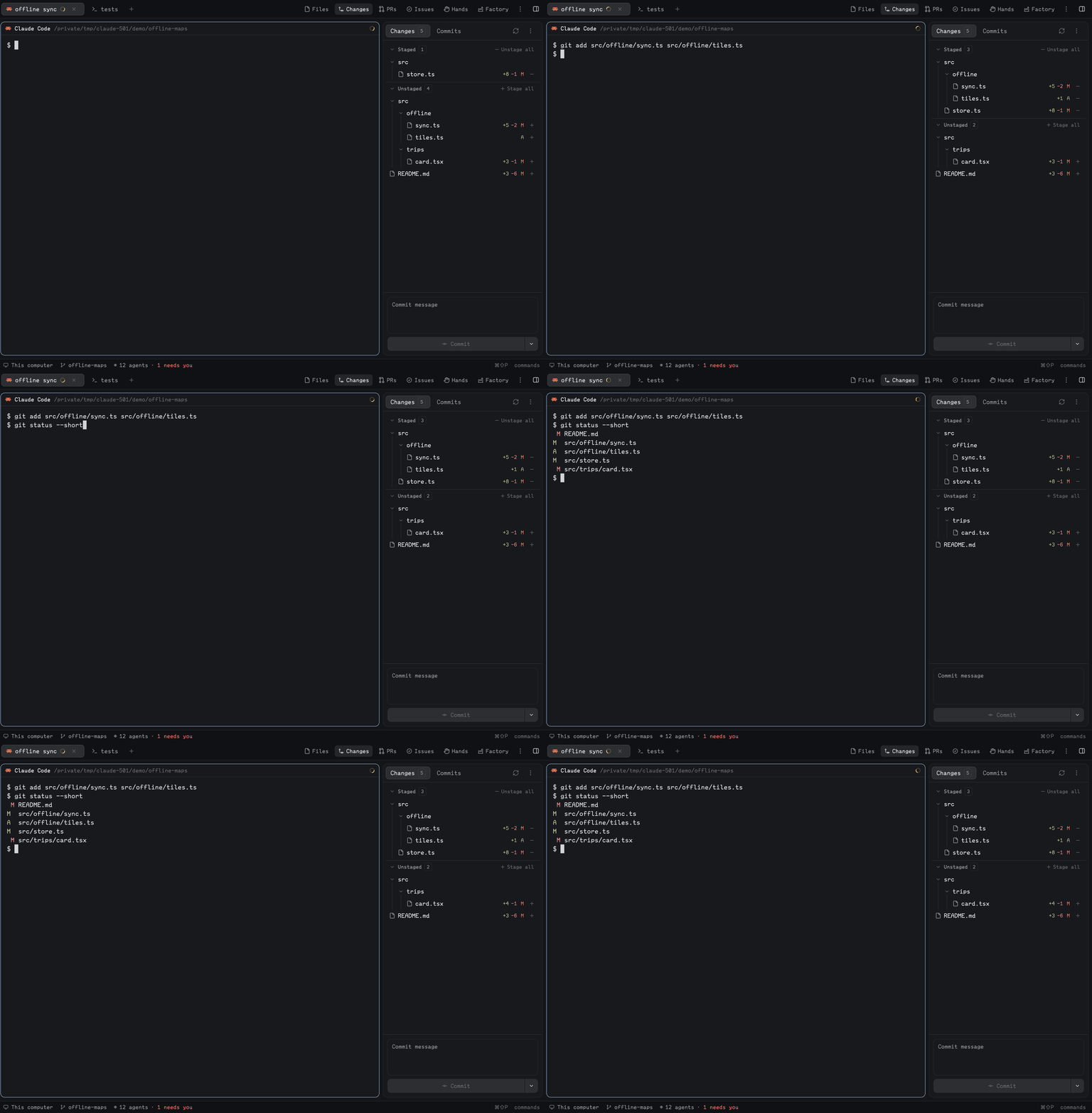
Quick start
- Install with the prompt below, then open the Changes panel.
- Click a changed file: its diff opens in a centre tab. Use the ⋮ menu for Side by side.
- Press + on the files you want, type a message in the box at the bottom, and press Commit. Nothing is pushed.
Install
Read ~/.config/herdr-app/AGENTS.md, then add this mod: https://github.com/munza/herdr-mods/tree/main/better-changesRequires Git on each machine you use. The agent follows RECIPE.md. Herdr's shipped layouts are read-only and restored on start, so the panel only shows in a layout you own: on a shipped layout, the agent clones it and points its changes node's content.mod at better-changes. In your own layout, it asks where the panel goes. The manifest docks it on the right at 368px.
Install by hand
To install by hand, copy mods/better-changes/ into Herdr's mods folder. A symlink loads the code but not the icons. From a clone of the repository, sync.sh does the copy:
./better-changes/sync.sh
To open the panel from a key, bind any key to mod.open:better-changes in ~/.config/herdr-app/keys.json:
"global": { "cmd-alt-g": "mod.open:better-changes" }
It opens the panel and selects it if it shares a stack, such as Herdr's Files and Changes. On an open panel it does nothing, unless panel.toggle is on: then it closes it. A layout without the panel shows a notification.
Use
- Changes tab: lists Conflicts, Staged, Unstaged and Committed (not pushed yet) files in collapsible groups. Empty groups are hidden. The tab's badge counts changed files.
- Staging: + and − on a row stage or unstage that file. Stage all and Unstage all act on the whole repository except conflicts. Working files on disk are never changed.
- View menu (⋮): picks Flat or Tree for file lists, and Inline or Side by side for diffs.
- Diffs: clicking a file opens its diff in one reusable centre tab per space, named after the file. It comes back to that file after a restart.
- Full file: hover the diff's header row and choose Full file to see the whole file with its changes marked. It stays on for every diff until you turn it off, and still stops at
limits.diff_lines. - Commit and Amend: type a message in the box at the bottom; Enter makes a new line and only the button commits. The chevron switches between Commit and Amend without running either. Commit takes only what is staged. Amend rewrites the latest commit and can change just its message; it loads the latest message into an empty box, never over your text, and stops if the latest commit moved meanwhile. A failure keeps your message. The mod never pushes.
- Conflicts: conflicted files get their own group at the top, each saying what kind it is, such as "both edited". Opening one shows only the conflict blocks with Git's
<<<<<<<,=======and>>>>>>>markers and the file's real line numbers. Side by side puts yours on the left and incoming on the right. Resolving is left to an agent or your editor, and Commit and Amend stay off until no conflicts remain. - Commits tab: your branch first with its unpushed commits, then its remote branch, and on a feature branch
origin/HEADfrom where your branch left it. A group says N not pulled when the remote has commits you lack. The tab's badge counts unpushed commits. It reads the last fetch and never fetches. - Commit details: opening a commit shows its description and changed files, with a link to GitHub for commits already pushed to an
originon GitHub. - Refresh: the refresh button rereads Git at once. Git is also read every
refresh.status, and local repositories are watched. - Remote spaces: Git and file reads run on the space's own machine.
Limits: Stage all and Unstage all apply past the file limit. Side by side pairs removed and added lines by position, not by similarity. A rename shows as a deletion and an addition.
Settings
Change them in Better Config or in ~/.config/herdr-app/mods/better-changes/mod.json under "settings", with only what you change. Saving applies at once.
| Key | Default | What it does |
|---|---|---|
refresh.status | "10s" | How often Git is read for changes. |
limits.files | 1000 | The most files a list shows. |
limits.diff_lines | 1500 | The most lines a diff shows, Full file included. |
limits.line_length | 4000 | Longer lines in a diff are cut here. |
limits.commits_per_page | 50 | How many commits load at a time. |
default.view | "tree" | How file lists start (tree or flat), until you choose in the ⋮ menu. |
default.diff | "inline" | How diffs start (inline or split), until you choose in the ⋮ menu. |
panel.toggle | false | Lets the panel key close an open panel, instead of leaving it alone. |
Update
Copy mods/better-changes/ into Herdr again. The copy replaces the installed mod.json, so the settings you changed go back to their defaults; Better Config notices and offers to restore them.
For developers
Mod commands, for keys and shown copies: better-changes.refresh, better-changes.changes and better-changes.commit (switch tab), better-changes.flat, better-changes.tree, better-changes.inline, better-changes.split, and better-changes.open:<path>.
Props { "mode": "diff", "space", "source", "selection" } make a diff tab; with no props it's the sidebar.
One header row: Herdr's pane header names a diff tab better-changes, so a diff tab has two rows. To get one, use this mod as the pane header in a layout you own. It draws Herdr's header with the file added, and looks the same as Herdr's on terminals. It's a copy of Herdr's pane mod, so it won't pick up later changes to it.
"pane": { "header": { "content": { "mod": "better-changes" } } }
Shared state: the diff publishes shared("pane-heads")[pane] = { title, detail, icon, add, del }, which the header shows, and the mod publishes shared("mod-icons")["better-changes"] for a tab bar that draws mod icons. Better Files uses better-changes.selection and better-changes.diff-tabs to open a diff here.
Work on the mod
In mods/better-changes/:
main.js: setup, settings and commands.settings.js: shared with the other mods.panel.js: what the panel key does, with no Herdr calls.git/repository.js: following the repository, the index, history, commit and amend.git/reads.js: plain functions that read from Git.git/model.js: parsing with no Herdr calls.views/sidebar.js,views/diff.js,views/pane-header.js: the three things it draws.views/ui.js: the design kit.icons/: Lucide icons and Herdr's pane header icons.mod.schema.json: every setting with its default, which must match the code'sDEFAULT_SETTINGS.sync.sh, besidemods/: copies the mod into Herdr, which reloads it.
node --test tests/*.test.cjs
herdr-app check "$PWD/mods/better-changes"
herdr-app check only draws the empty state, so a mistake in a list or the commit box shows up only in the running panel.