Better Config
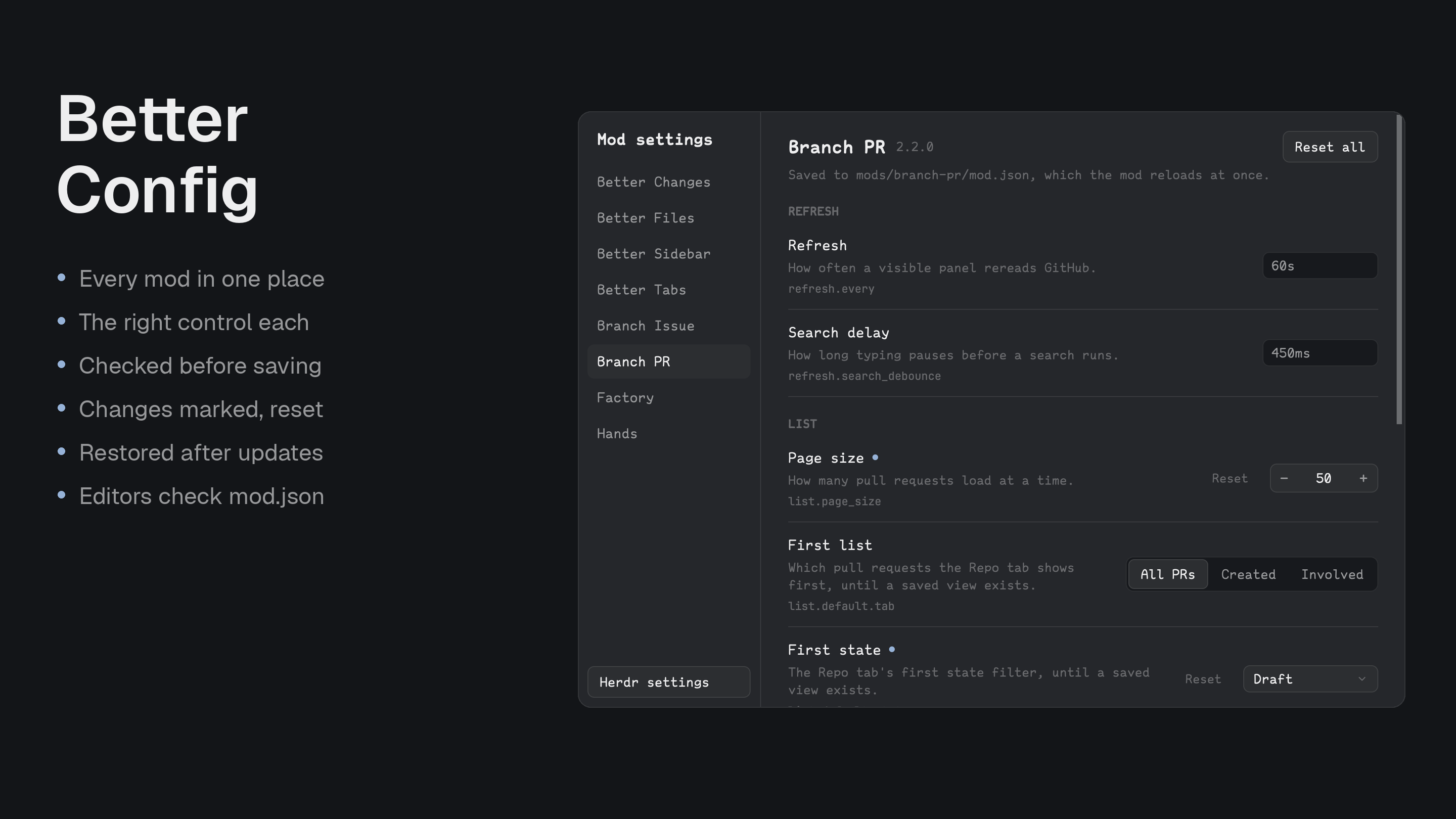
Every installed mod's settings in one dialog, drawn like Herdr's own Settings. For anyone who would rather not hand-edit each mod's mod.json or read its README to learn what a key does.
Quick start
- Install with the prompt below and say yes to the suggested key, ⌘⌥,.
- Press the key and pick a mod from the list. Change a setting: it's checked, saved and applied at once.
- A dot marks what you changed. After a mod updates, a box at the top offers to restore your values.
Install
Read ~/.config/herdr-app/AGENTS.md, then add this mod: https://github.com/munza/herdr-mods/tree/main/better-configThe agent follows RECIPE.md. It's a dialog, so it needs no place in a layout. The agent never overwrites an unrelated mod with the same name, and merges the suggested key into your keys.json only if you agree.
Install by hand
To install by hand from a clone of the repository, sync.sh copies mods/better-config/ into Herdr's mods folder:
./better-config/sync.sh
Herdr's command palette doesn't list mods, so give it a key. keys.json suggests ⌘⌥,, next to Herdr's own ⌘, for Settings. Merge it into ~/.config/herdr-app/keys.json:
{ "global": { "cmd-alt-,": "mod.open:better-config" } }
Herdr stops adding new default shortcuts to a keys.json you've edited, so if you've never changed yours, this edit makes it yours. Without a key, this opens it too:
herdr-app do mod.open '{"name":"better-config"}'
Use
- Open and close: the key opens the dialog; the same key, or Esc, closes it.
- One page per mod: the list on the left has each installed mod with settings; a red dot marks one that needs attention. Each page shows every setting's name, what it does and its key, grouped by the first part of the key.
- The right control: on/off switches; buttons for up to four choices, else a dropdown (↑, ↓, Enter, Esc); − and + for numbers; text boxes for times (
450ms,10s), sizes (60KB), text and comma-separated lists. A text box saves on Enter or when it loses focus. - Checked before saving: a value that doesn't fit is explained in red under its field and never written. A bad value typed into
mod.jsonby hand shows there too. - Applies at once: a change is saved to the mod's own
mod.json, and Herdr reloads the mod straight away. - See what you changed: a dot marks every setting that differs from its default. Reset puts one back, and Reset all puts a whole mod back.
- Survives updates: when an update puts defaults back over your values, a box at the top lists each one, yours beside the current value, ticked to start. One button restores the ticked ones and keeps the rest.
- Works with any mod: a mod that ships a schema of its settings gets names, descriptions and checks. Any other mod with a
settingsblock still shows, with its types guessed. - Herdr settings: at the bottom of the list, opens Herdr's own Settings.
Where values live: in the settings block of each mod's installed mod.json, holding only what you changed; a change back to the default removes the key. Better Config also keeps a copy of what you changed in ~/.config/herdr-mods/better-config/<mod>.json. A value you changed by hand is taken as yours, and the copy follows it. A write only goes through if the file hasn't changed since it was read.
Limits: a mod with no settings in its mod.json and none described in a mod.schema.json doesn't appear. Values that are objects show as their separate keys, and a list holds words only. For settings without a described default, only a version change shows an update took them.
Settings
Better Config has no settings of its own.
Update
Copy mods/better-config/ into Herdr again. The copy of your changes for other mods lives outside every mod's folder, in ~/.config/herdr-mods/better-config/, so updating keeps it.
For developers
To have Better Config show your mod's settings, describe its mod.json in a JSON Schema beside it, mods/<name>/mod.schema.json, and point mod.json at it, so editors check the file too:
{ "$schema": "./mod.schema.json", "version": "1.0.0", "place": "none", "title": "My Mod" }
The schema describes Herdr's own fields and, under properties.settings, each setting, nested the way settings is. Each leaf is a setting at its dotted key, such as refresh.every:
"settings": {
  "type": "object",
  "additionalProperties": false,
  "properties": {
    "refresh": {
      "type": "object",
      "additionalProperties": false,
      "properties": {
        "every": { "title": "Refresh", "description": "How often the panel rereads.", "type": ["string", "integer"], "format": "duration", "default": "60s" }
      }
    },
    "page_size": { "title": "Page size", "description": "How many load at a time.", "type": "integer", "minimum": 1, "maximum": 100, "x-step": 5, "default": 25 },
    "view": { "title": "View", "description": "How the list starts.", "type": "string", "enum": ["tree", "flat"], "x-labels": { "tree": "Tree", "flat": "Flat" }, "default": "tree" }
  }
}
| Keyword | Meaning |
|---|---|
title, description | What the dialog shows. The title defaults to the key's last part. |
default | What the mod uses when nothing is set. Keep it equal to the default in the mod's code. Reset removes the key so the mod uses it. |
type | boolean; integer or number; string; array of strings for a list. |
enum | A fixed set of choices. Up to four show as buttons, more as a dropdown. x-labels names them: { "value": "Label" }. |
format | duration (450ms, 10s) or size (60KB), with type: ["string", "integer"] since a bare number is also accepted. Add a pattern so editors check it. |
minimum, maximum | A number's limits. x-step is how far − and + move it, x-unit a unit shown beside it, such as px. |
Only these keywords are read; oneOf, $ref and the like are ignored. Ship mod.json without a settings block: it holds only what a person changes, and the mod uses its own defaults for the rest. Every mod in this repository ships a schema, and a test checks that each mod.json passes it and its defaults equal the mod's code.
Work on the mod
mods/better-config/main.js: the dialog.mods/better-config/model.js: fields, checks, typed input, what changed and what was lost. No Herdr calls, and the tests run it as it is.mods/better-config/mod.json,mod.schema.json,icons/.keys.json: the suggested key.
node --test tests/*.test.cjs
./sync.sh
herdr-app check "$HOME/.config/herdr-app/mods/better-config"
Tests can't draw the dialog, so also look at the running app.