Better Files
A read-only file browser for Herdr Desktop that opens files in the centre pane, beside your agents. For people directing agents: see where an agent has been, read what it wrote, and hand a file to one.
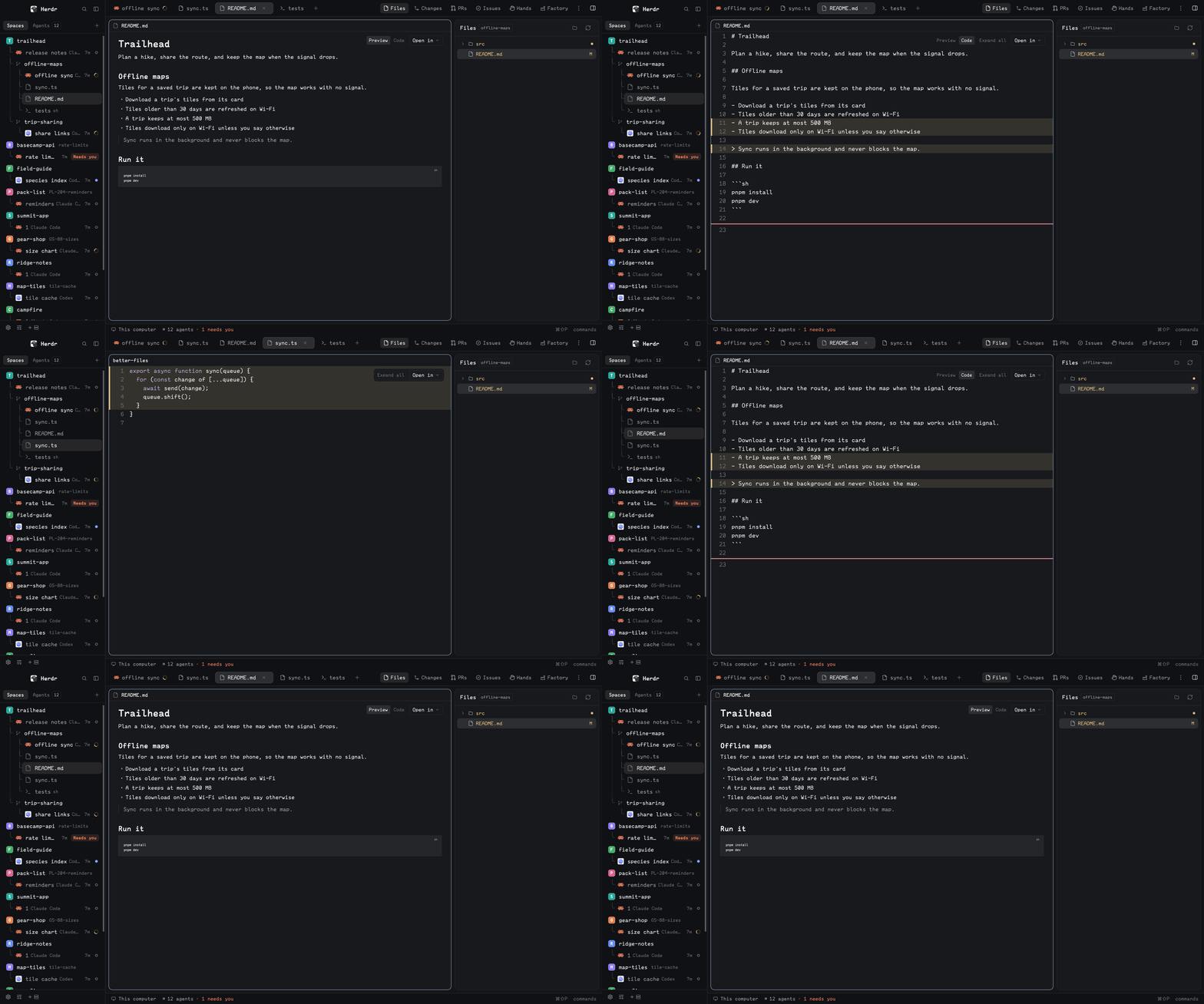
Quick start
- Install with the prompt below, then open the Files panel.
- Click a file to read it in the shared centre tab; double-click to keep the tab. Coloured files and lines are what changed since the last commit.
- Right-click a file and choose an agent to send it to, with a prompt of your own.
Install
Read ~/.config/herdr-app/AGENTS.md, then add this mod: https://github.com/munza/herdr-mods/tree/main/better-filesRequires sh, and Git for the change marks. Finding editors uses macOS Spotlight. The agent follows RECIPE.md. Herdr's shipped layouts are read-only, so the sidebar only shows in a layout you own, and the agent never overwrites an unrelated mod with the same name.
The manifest has place: none, so add it to a layout you own, or point a block that uses Herdr's files at it:
{ "id": "files", "type": "block", "content": { "mod": "better-files" } }
Install by hand
To install by hand from a clone of the repository, sync.sh copies mods/better-files/ into Herdr's mods folder. A symlink loads the code but not the icons.
./better-files/sync.sh
Use
- Tree: shows the focused pane's folder, named in the panel's title. Changed files are coloured and lettered (green new, yellow edited, red gone or in conflict), and folders holding changes are yellow with a dot. It refreshes as files change. Focusing a file or diff tab leaves the tree where it was.
- Click a file to show it in one shared centre tab, so browsing doesn't pile up tabs.
- Double-click, or Keep tab, to keep that tab. The next click starts a new shared tab.
- File view: read-only, at your terminal's font size, and follows the file as it changes on disk. Binary and unreadable files say so, and very long files are cut at 400,000 characters.
- Changed lines: lines that differ from the last commit are tinted with a bar at their edge: green added, yellow changed, and a thin red line where lines were removed. Click a yellow line or the red line to show the old lines in place; click again to close. Expand all, beside Open in, opens or closes them all. Text can't be selected and there's no folding in this view; use Open in, or turn
gutteroff. - Images: PNG, JPEG, GIF, WebP, BMP and SVG files show as pictures fitted to the pane, and update when the file changes. Each is shown through a copy in
mods/better-files/cache/, removed when its tab closes. - Markdown: a
.mdor.markdownfile opens rendered in Herdr's own Markdown view, with text you can select. Preview and Code, beside Open in, switch between that and the file view with its changed lines; each tab remembers its choice. A web link opens in your browser, and a link to another file here opens it in the viewer. A picture on a line of its own, from this computer, shows inline. The preview follows the file as it changes. - Open in your editor, from the tab or the menu. Zed, VS Code, Cursor, Windsurf, Sublime Text and Nova are offered when installed, and you can add more with
editors. The folder icon beside refresh opens the whole folder in an editor or Finder. - Right-click a file or folder for: Open and Open in new tab; Open in each editor; Open in default app; Show in Finder; Show diff (opens a changed file's diff in Better Changes, if you have it); Copy relative path and Copy full path.
- Send to an agent: from the right-click menu, pick an agent that's running, (spawn) to start a sub-agent under it, or a new one in its own tab. A box asks what it should do; only Send delivers. The agent gets your prompt and the path, not the file's text.
- One title: the tab's title row shows the file, its folder, and Preview while it's the shared tab.
- Remote spaces: a space on another machine has no editor, default app or Finder items, and can't show images.
Editing, creating, renaming and deleting files are left out on purpose. Limits: a folder lists its first 500 entries and the tree shows 5,000 rows. A file view can't report a selection or jump to a line, so editors open at the top. Listing a folder needs sh, so a Windows machine shows an error.
Settings
Change them in Better Config or in ~/.config/herdr-app/mods/better-files/mod.json under "settings", with only what you change. Saving applies at once.
| Key | Default | What it does |
|---|---|---|
refresh.tree | "10s" | How often the tree rereads, on top of watching the folder. Never closer than 1 second. |
refresh.file | "2s" | How often an open file is checked for changes. Never closer than 500ms. |
editors | [] | More editors for Open in, each { "name": "PhpStorm", "bundle": "com.jetbrains.PhpStorm" } by macOS app ID. Shown only if installed. |
gutter | true | Tint changed lines. Off uses Herdr's own editor: fuller highlighting, selection and folding, but no line colours. |
markdown | "preview" | How a Markdown file first opens: "preview" or "code". The toggle in a tab overrides it for that tab. |
Update
Copy mods/better-files/ into Herdr again. The copy replaces the installed mod.json, so the settings you changed go back to their defaults; Better Config notices and offers to restore them.
For developers
One class plays three roles, each its own copy: sidebar, viewer and menu, connected by shared("better-files.*"). Viewers register in better-files.viewers, and the menu leaves its question in better-files.compose for the sidebar to ask.
The viewer publishes its title to shared("pane-heads"), which Better Changes' pane header shows. Show diff hands over through better-changes.selection and better-changes.diff-tabs, keyed to the Git root.
Sending to agents: a running agent gets hc send; (spawn) runs hc run --bg --parent <agent> --cwd <folder> <program> <message> directly, so no shell sees the message; a new agent gets tab.new with the message as its first prompt. Editors are found with mdfind by macOS app ID and opened with open -b. Changed lines come from git diff -U0 HEAD.
Work on the mod
main.jslists what's where.settings.js: shared between the mods.files/:model.js,reads.js.actions/:open.js,outside.js,agents.js,menus.js.views/:ui.js,tree.js,viewer.js,context-menu.js.icons/.mod.schema.json: every setting with its default, which must match the code'sDEFAULT_SETTINGS.
node --test tests/*.test.cjs
./sync.sh
herdr-app check "$HOME/.config/herdr-app/mods/better-files"
Tests use stand-ins for Herdr, and herdr-app check draws only the sidebar's first frame, so also look at the running app.