Branch Issue
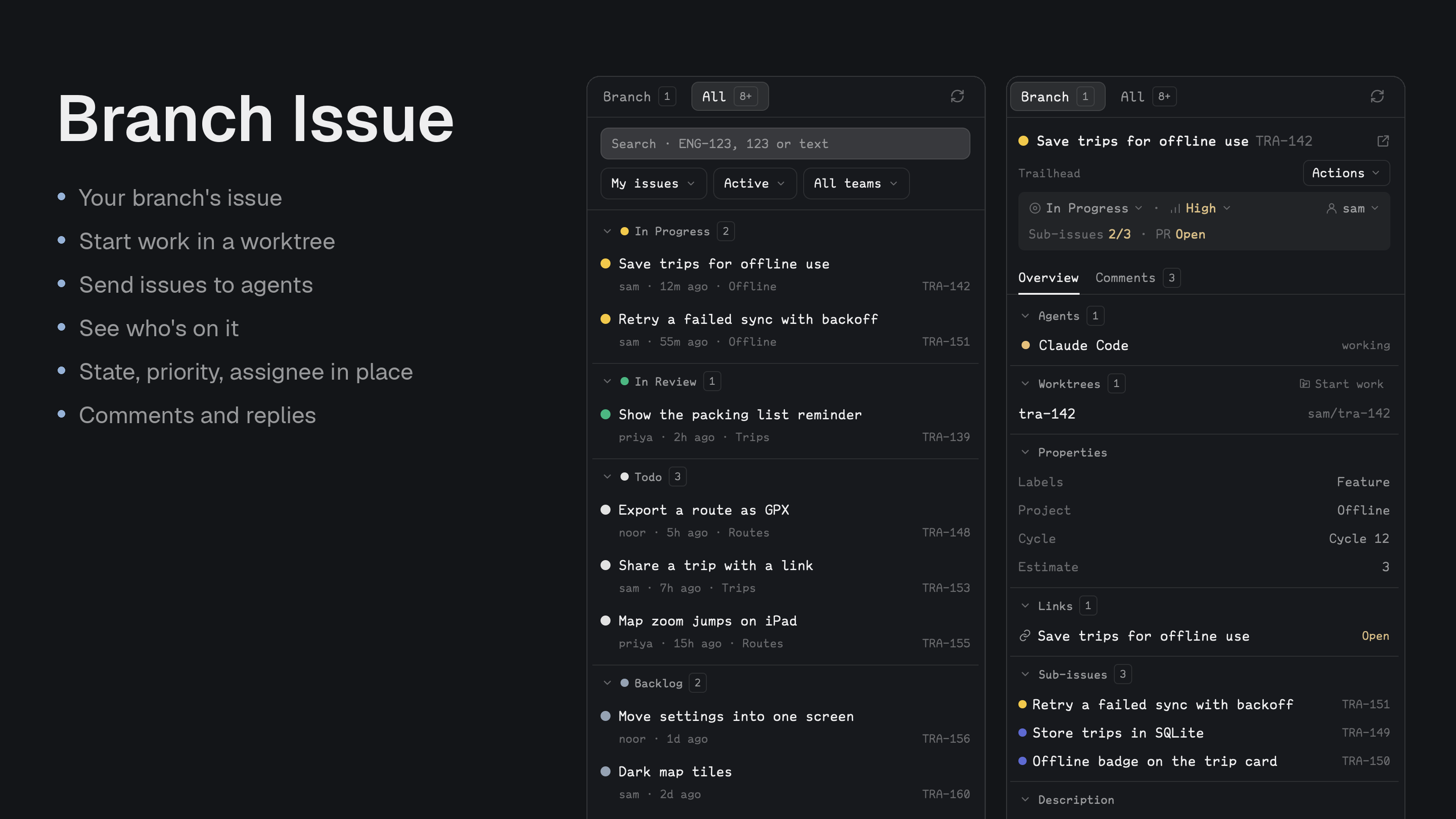
A Linear panel for the Herdr sidebar, for people who hand issues to agents: see where an issue stands, give it its own worktree, send it to an agent, and keep it up to date. A sibling of Branch PR.
Quick start
- Create a Linear personal API key, export it as
LINEAR_API_KEYin your shell, then install with the prompt below. - Open the Issues panel: on a branch named like
ENG-123-…it shows that issue; otherwise use the All tab. - From Actions, choose Create worktree to start a new space with an agent that already has the issue.
Install
Read ~/.config/herdr-app/AGENTS.md, then add this mod: https://github.com/munza/herdr-mods/tree/main/branch-issueRequirements: Go 1.23+ to run the installer and build the helper, Git on the machines your spaces run on, and a Linear personal API key. Agent actions use hc and a running agent.
The helper reads the key from the LINEAR_API_KEY environment variable and nothing else: there is no key field, keychain entry or token file. Create a personal key at https://linear.app/settings/api and export it in your shell. The helper checks its own environment, then asks your login shell, so a key exported in .zshrc or by home-manager is found even when Herdr was launched from the Dock. The key goes to api.linear.app only and is never stored. If it is missing or rejected, the panel says what to run and offers Try again.
Before installing, the agent explains what the panel can write, and only on an explicit click: post comments and replies, change an issue's state, priority and assignee, fetch a base branch, create Git worktrees and branches, write the branch-to-issue link to Git config, open spaces, and send messages to agents. Nothing writes on its own.
Install by hand
To install by hand, from the branch-issue folder:
go -C helper run ./install          # first install
go -C helper run ./install --update # later
The installer builds the helper, copies only mods/branch-issue/ to ~/.config/herdr-app/mods/branch-issue/, and runs herdr-app check. It doesn't edit layouts or keys.
The manifest has place: none, so add the panel to a layout you own, about 368px wide:
{ "id": "linear-issues", "type": "block", "content": { "mod": "branch-issue" } }
With Better Tabs, a button can open it (target is that block's layout ID):
{
  "id": "issues",
  "label": "Issues",
  "icon": "mods/branch-issue/icons/issue.svg",
  "action": { "type": "panel", "container": "panel", "stack": "panel-body", "target": "linear-issues" }
}
No key binding ships with it.
Use
- Branch tab: the issues on the active terminal's branch. With exactly one, it opens straight to its details. The panel joins identifiers stored in
git config branch.<branch>.herdr-issuewith anyTEAM-123in the branch name, and drops those Linear doesn't know. - Link issue: with nothing found, enter an identifier; Linear confirms it and the link is written to Git config. A hand-made link can be removed with Unlink in the Actions menu.
- All tab: search, My issues / Active cycle / All issues, state and team filters, with issues grouped by workflow state in collapsible groups. Search starts at three characters, or at any length for a number.
+ moreloads the next batch. - At a glance: state, priority and assignee sit on one line under the title; click one to change it. Sub-issues done and pull request status appear below when the issue has them.
- Create worktree: from the Actions menu or the Worktrees group. It uses Linear's branch name, starts from a branch you pick (the remote's default branch, or another to stack one PR on another), opens a new space with a terminal or an agent, and can move the issue to Started. An agent gets the issue's link and details and waits for your next message.
- Agents: agents working on the issue are listed with their state; click one to go to it.
- Send to agent: hand over the issue or a comment thread with a prompt you can edit, to an agent from the dropdown, a sub-agent under it with (spawn), or a new agent in its own tab. New agents work in the issue's worktree if it has one. Only Send delivers it.
- Overview: collapsible groups for Agents, Worktrees, Properties (labels, project, cycle, estimate), Links with pull request status, Sub-issues and Parent, and the Description.
- Comments: threads with Reply, a copy icon for each comment's link, and a box for a new comment after the last thread. Drafts are kept per issue.
- Remote spaces: Git runs on the space's machine; the Linear helper runs on this computer.
- Refresh: a visible panel rereads Linear on a timer; a hidden one doesn't, and catches up when shown.
Settings
Change them in Better Config or in ~/.config/herdr-app/mods/branch-issue/mod.json under "settings". Unknown keys and wrong types are reported at the top of the panel and ignored.
| Key | Default | What it does |
|---|---|---|
refresh.every | 60s | How often a visible panel rereads Linear. |
refresh.search_debounce | 450ms | How long typing pauses before a search runs. |
branch.max_identifiers | 4 | The most issue identifiers one branch may carry (at least 1). |
list.default.scope | mine | The list's first scope until a saved view exists: mine, cycle or all. |
list.default.state | active | The first state filter: active, backlog, started, done, cancelled or all. |
list.default.team | "" | A team key to filter by at first, such as DEM. Empty shows every team. |
worktrees.root | ~/.herdr/worktrees | Where new worktrees are put. |
worktrees.open_with | terminal | What a new worktree opens: terminal, or an installed agent's key such as claude. |
worktrees.move_to_started | false | Preselect moving the issue to its started state when you create a worktree. |
Update
Run go -C helper run ./install --update from the branch-issue folder. Your settings block is kept.
Upgrading from 1.x
2.0 is a rebuild around agents. The All issues center tab is gone (use the All sidebar tab, and remove any props: { "mode": "browser" } tab or command). Every command except refresh is gone. Editing comments, Markdown preview and editing labels are gone. The tracker setting is gone. Icons moved to icons/, so a Better Tabs button's mods/branch-issue/issue.svg becomes mods/branch-issue/icons/issue.svg.
For developers
branch-issue.refresh reloads the panel. Commands reach copies that are showing.
The helper, mods/branch-issue/bin/herdr-linear, is a JSON bridge to Linear's GraphQL API with validated requests and a 26-second timeout. The branch-to-issue link is plain Git config, comma separated, so you can set it yourself:
git config branch.<branch>.herdr-issue ENG-123
Messages the panel sends to agents tell them to treat Linear's text as data and not to post unless asked.
Work on the mod
mods/branch-issue/main.js: the panel, and a map of what's where.linear/:model.js(what Linear's answers mean),discovery.js,reads.js.actions/: writes and handoffs (changes.js,agents.js,worktrees.js,menus.js).views/: drawing, with the shared look inviews/ui.js;state/saved.js;icons/.mod.schema.json: settings and defaults, which must matchDEFAULT_SETTINGSin the code.helper/main.go: the Linear bridge;helper/install/: the installer.
node --test tests/*.test.cjs
(cd helper && go test ./... && go vet ./...)
herdr-app check "$HOME/.config/herdr-app/mods/branch-issue"
Tests use stand-ins for Linear, and herdr-app check draws only the empty state, so also look at the running app. Never test writes against someone's workspace without their say-so.