Better Tabs
A tab bar with tabs you can drag, that wrap onto more lines when they don't fit, and a toolbar of panel buttons with a ⋮ menu for the ones you rarely use.
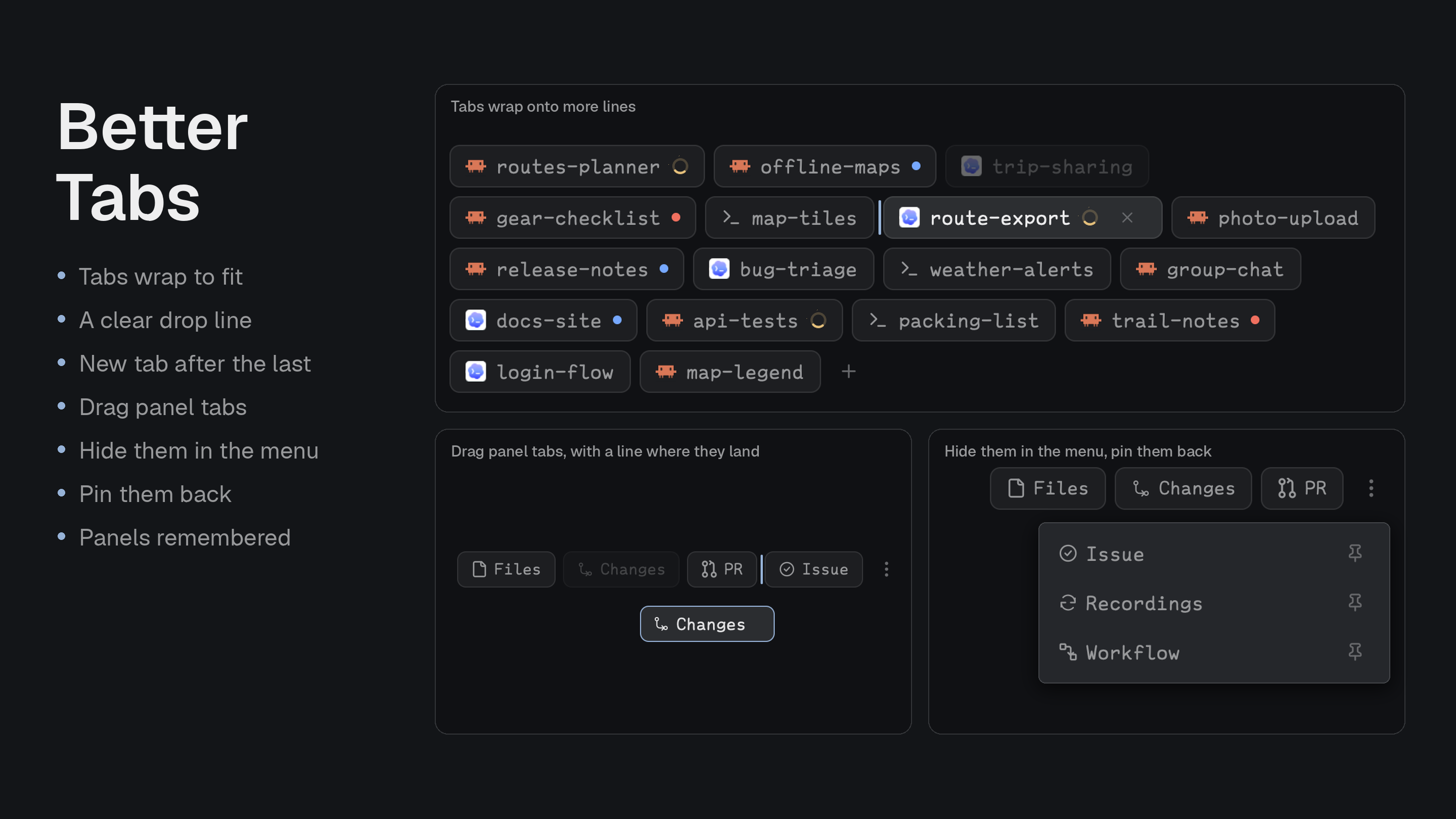
Quick start
- Install with the prompt below. It takes the place of your tab bar.
- Press and hold a tab, then drag it to reorder. Open enough tabs and they wrap onto a second line.
- Drag a panel button onto ⋮ to hide it; click ⋮ and the pin to bring it back.
Install
Read ~/.config/herdr-app/AGENTS.md, then add this mod: https://github.com/munza/herdr-mods/tree/main/better-tabsNo requirements. The mod runs no programs and reaches no network; it runs Herdr commands and keeps its preferences in Herdr's shared state.
The agent copies mods/better-tabs/ into the app configuration. The manifest uses "place": "none" and Herdr's shipped layouts are read-only, so the agent points the tabs block in a layout you own at better-tabs, keeping its size and window_drag. The mod installs no key bindings.
Use
- Drag tabs: reorder them. A line in the gap between tabs shows where the tab will land. Dropping on + puts it last; leaving the bar cancels.
- Quick clicks never drag: a drag starts only once a press has lasted 400ms and the pointer has moved 12px.
- Wrapping: tabs wrap onto more lines and the bar grows to hold them, then shrinks back as tabs close.
- New tab: the + sits right after the last tab.
- Tabs: double-click to rename, right-click for the tab menu, close the active tab with its ×.
- Status: program icons, a spinner while working, and a dot when blocked or done.
- Panel buttons: Files, Changes and any you add. Drag them to reorder, the same way as tabs.
- The ⋮ menu: drop a button on it to hide it. Click ⋮ to see hidden buttons, then click one to use it, drag it back out, or click its pin to return it to the toolbar. Buttons with no room also go there.
- Panel memory: each space remembers which panel it had open.
- Window controls where the system needs them.
Settings
Change them in Better Config or in ~/.config/herdr-app/mods/better-tabs/mod.json under "settings".
| Key | Default | What it does |
|---|---|---|
tabs.max_width | 170 | The widest a tab gets, in px. At least 60. |
tabs.drag_delay | 400ms | How long a press must last before a tab can be dragged. |
menu.width | 240 | The width of the ⋮ menu, in px. At least 120. |
Update
Copy mods/better-tabs/ into ~/.config/herdr-app/mods/ again (or ask your agent to). This replaces mod.json; Better Config notices settings it reset and offers to restore them. Your toolbar arrangement lives in shared state, not the mod folder.
Upgrading from 2.x
3.0 removes options nothing used, including hooks.js, buttons from other mods (contributions), the mod-tab, overlay, toggle-stack, sequence, shared and hook actions, badges, the enabledWhen, activeWhen and disabled conditions, and props such as tabMaxWidth, maxButtons and commands. Mouse-wheel tab switching is gone, and tabs wrap instead of scrolling.
For developers
Without configuration, the toolbar offers Files and Changes when those layout nodes exist. To choose the buttons, set props on the tabs block. Your list replaces the defaults.
{
  "mod": "better-tabs",
  "props": {
    "rememberPanels": { "container": "panel", "stack": "panel-body" },
    "buttons": [
      {
        "id": "changes",
        "label": "Changes",
        "icon": "changes",
        "group": "panels",
        "action": { "type": "panel", "container": "panel", "stack": "panel-body", "target": "changes" }
      },
      {
        "id": "palette",
        "label": "Commands",
        "group": "tools",
        "action": { "type": "command", "name": "app.palette" }
      }
    ]
  }
}
| Button field | Required | What it does |
|---|---|---|
id | Yes | Unique. The arrangement is saved by it. |
action | Yes | panel shows or hides a panel by layout node ID (container, stack, target), or command runs an app or mod command (name, optional args). |
label | No | Defaults to the ID. |
icon | No | A bundled name (file, changes) or an SVG path from the Herdr home, like mods/my-panel/icon.svg. |
tooltip | No | Hover text. |
group | No | A separator appears where the group changes. |
when | No | { "node": "changes" } shows the button only while that layout node exists and isn't hidden. |
rememberPanels names the panel container and stack for per-space panel memory; false turns it off. The arrangement is saved per layout, by button ID, in shared state, and doesn't edit the layout file.
Commands, to bind in keys.json if you like:
herdr-app do better-tabs.button:changes   # run a button by ID
herdr-app do better-tabs.overflow         # open the ⋮ menu
A mod's tab shows the icon it publishes in the mod-icons shared map. Better Changes does this.
Work on the mod
mods/better-tabs/main.js: setup, settings and commands.settings.js: shared with the other mods.actions/engine.js: what a button does.actions/toolbar.js: arrangement and tab-move logic with no drawing.views/tab-bar.js: the bar.views/menu.js: buttons and the ⋮ menu.views/drags.js: dragging.views/arrangement.js: saved order.views/panel-memory.js: panels per space.views/ui.js: the design kit.icons/: the mod's icons.sync.sh: copies the mod into Herdr, which reloads it (a symlink loads the code but not the icons).tests/tabs.test.cjs: the tests.
node --test tests/*.test.cjs
herdr-app check "$PWD/mods/better-tabs"