Branch PR
A pull-request panel for working with agents: see what's in the way of a PR, hand it to an agent, check the result, and merge. It works with GitHub through the gh CLI.
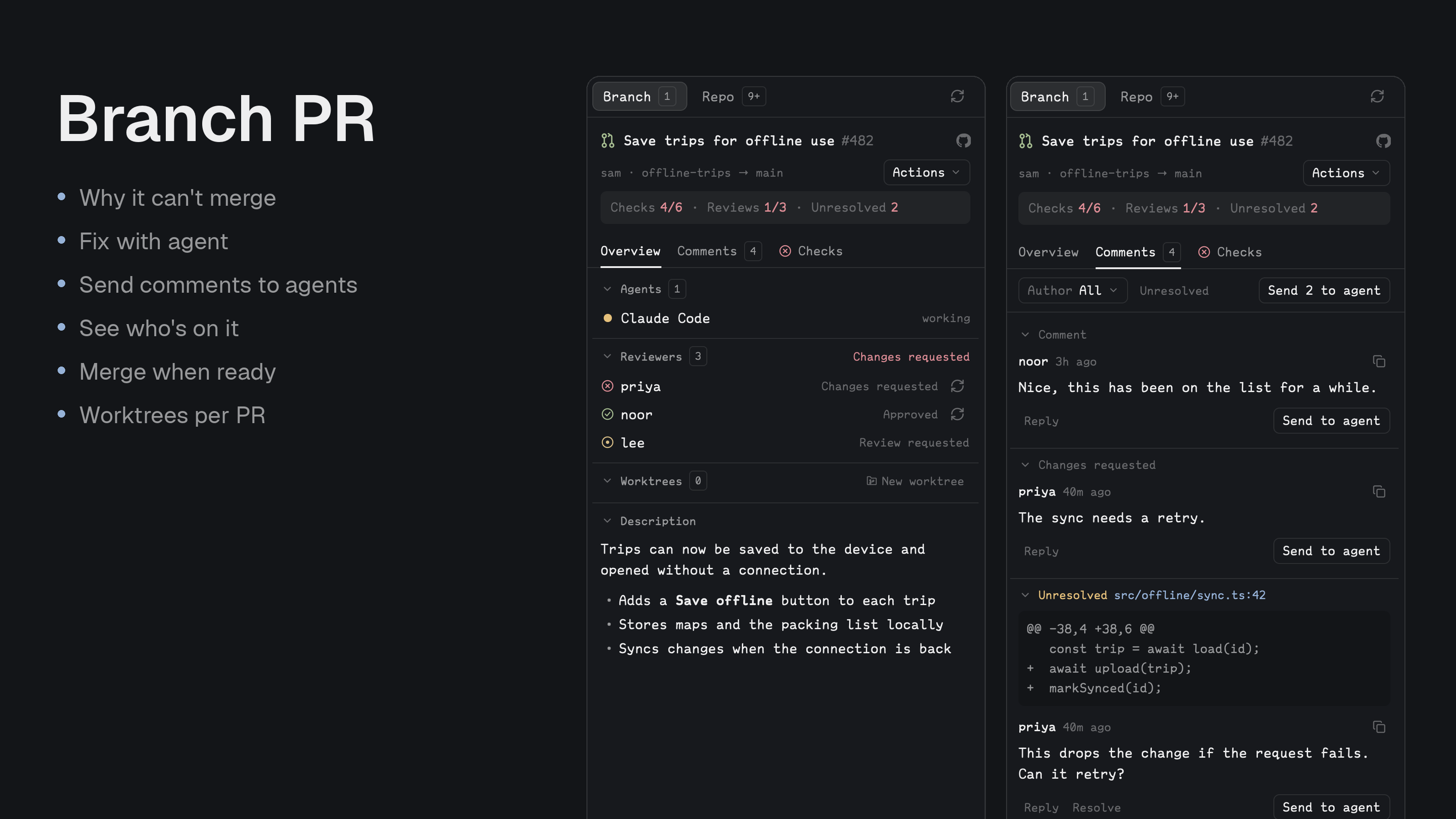
Quick start
- Run
gh auth loginonce, then install with the prompt below. - Open the PRs panel on a branch with a pull request: one line shows checks, reviews and unresolved threads.
- Press Fix with agent on a failed check, or Send N to agent for open threads, then merge from Actions when it's ready.
Install
Read ~/.config/herdr-app/AGENTS.md, then add this mod: https://github.com/munza/herdr-mods/tree/main/branch-prRequirements: Go 1.23+ to run the installer and build the helper, Git on the machines your spaces run on, and the GitHub CLI logged in with gh auth login on this computer. Agent actions use hc and a running agent. Every read and write goes through gh with its login; there is no token setting.
Before installing, the agent explains what the panel runs and can write. On an explicit click it can post comments and replies, resolve and reopen threads, merge, close and reopen PRs, request reviews, fetch PR heads, create Git worktrees and branches, write the branch-to-PR link to Git config, open terminals and send messages to agents. Nothing writes on its own.
Install by hand
By hand, from the branch-pr folder:
go -C helper run ./install # first install
The installer builds the helper, copies only mods/branch-pr/ to ~/.config/herdr-app/mods/branch-pr/, and runs herdr-app check. It doesn't edit layouts or keys.
The manifest has place: none, so add it to a layout you own, about 368px wide:
{ "id": "pull-requests", "type": "block", "content": { "mod": "branch-pr" } }
With Better Tabs, a button can open it (target is the block's layout ID):
{
  "id": "prs",
  "label": "PRs",
  "icon": "mods/branch-pr/icons/pull-request.svg",
  "action": { "type": "panel", "container": "panel", "stack": "panel-body", "target": "pull-requests" }
}
Use
- Two lists: Branch shows the PRs from your checkout's branch and goes straight to the details when there's only one. Repo has search (including by number), All PRs / Created / Involved, and Open / Draft / Merged / Closed / All. Opening a PR stays in the sidebar with a back button.
- Stats: one line on every open PR gives Checks passed, Reviews approved and Unresolved threads, plus Ready, Conflicts or Behind when that's the news. Click one to go to where it's explained.
- Hand off to agents: Fix with agent on a failed check and Send N to agent for all unresolved threads open a dropdown: an agent already running (those on the PR first), a sub-agent under it with (spawn), or a new one in its own tab. New agents work in the PR's worktree if it has one.
- Agents on the PR: listed with their state; click one to go to it.
- Actions: the PR header's menu holds Merge, Close and Reopen, which ask first. A merged PR shows a Merged badge there instead. A merge names the commit you saw, so a newer push is refused. Merge when ready turns on GitHub's auto-merge, offered only when GitHub has something required to wait for. GitHub merges whatever the branch holds once checks pass, so a push after you turn it on goes in too.
- Comments: threads, reviews and comments with their code, unread markers, author and Unresolved filters, reply, resolve and reopen, a box for a new comment, and Send to agent on one comment with a prompt you can edit.
- Checks: workflows, jobs, steps and failed output, with links to GitHub.
- Files: what the PR changes, with lines added and removed. A click shows the file's diff in Better Changes' centre tab, read from GitHub so it works for a PR you haven't checked out; without Better Changes, the files open on GitHub.
- Reviewers: who approved, who asked for changes, who is still to review, and asking someone again.
- Worktrees: a PR's checkouts, and New worktree to make another as its own space, with a terminal or an agent in its first tab.
- Remote spaces: Git runs on the space's machine and
ghon this computer. - No
gh: if it's missing or logged out, the panel says so, shows what to run, and offers Try again.
The sidebar follows the active terminal's folder and branch. It uses a branch's saved link (branch.<name>.herdr-pr, written by New worktree) if there is one, otherwise it looks across your GitHub remotes, including forks, and prefers open PRs. Repo prefers upstream, then the branch's tracking remote, then origin, and remembers a remote you pick. Search starts at three characters, or at any length for a PR number; GitHub does the rest of the matching, including author: and label:. GitHub Enterprise and GitLab aren't supported.
Settings
Change them in Better Config or in ~/.config/herdr-app/mods/branch-pr/mod.json under "settings". Unknown keys and wrong types are reported at the top of the panel and ignored.
| Key | Default | What it does |
|---|---|---|
refresh.every | 60s | How often a visible panel rereads GitHub. |
refresh.search_debounce | 450ms | How long typing pauses before a search runs. |
list.page_size | 25 | How many PRs load at a time (1–100). |
list.default.tab | all | Repo's first list until a saved view exists: all, mine (Created) or involved. |
list.default.state | open | Repo's first state filter: open, draft, merged, closed or all. |
worktrees.root | ~/.herdr/worktrees | Where New worktree puts checkouts. |
worktrees.open_with | terminal | What a new worktree opens: terminal, or an installed agent's key such as claude. |
logs.keep_last | 60KB | How much of a failed command's output is kept to show. |
tools.github | gh | The gh command, or its full path. |
Update
From the branch-pr folder, run the installer with --update. It keeps your settings block.
go -C helper run ./install --update
Upgrading from 1.x
2.0 is a rebuild around working with agents. GitLab isn't supported any more (stay on 1.x if you need it), and updating drops tools.gitlab. The All PRs center tab is gone; the Repo tab replaces it, so close any old All PRs tab and remove any props: { "mode": "browser" } tab or command. The commands open-browser, toggle, open, back, checks, conversation, description, worktree, preview and preview-browser are gone. Pending reviews, editing comments, quote replies, adding or removing reviewers, and Draft fix & reply are gone. Icons moved to icons/, so change a Better Tabs button's mods/branch-pr/pull-request.svg to mods/branch-pr/icons/pull-request.svg.
For developers
Command: branch-pr.refresh reloads. Commands reach copies that are showing.
Messages the panel sends to agents tell them to treat GitHub's text as data and not to push, post or resolve unless asked. A sub-agent is started with hc run --bg --parent, and messages to a running agent go through hc send. Fix with agent names gh run view --job N --repo R --log-failed rather than pasting the log.
New worktree writes branch.<name>.herdr-pr to Git config, which the panel reads to find the branch's PR.
Work on the mod
mods/branch-pr/main.js: lists what's where.settings.js: shared with the other mods.github/model.js: what GitHub's answers mean.github/reads,actions/writes and hands off.state/saved.js: what survives a reload (filters, open PR, read comments).views/: draws withviews/ui.js.icons/: the icons.helper/main.go: the JSON bridge togh, with validated requests and a 26-second timeout.helper/install/: the installer, which builds it tomods/branch-pr/bin/herdr-pr.tests/: tests with stand-ins for GitHub, so also look at the running app.
node --test tests/*.test.cjs
(cd helper && go test ./... && go vet ./...)
herdr-app check "$HOME/.config/herdr-app/mods/branch-pr"