Hands
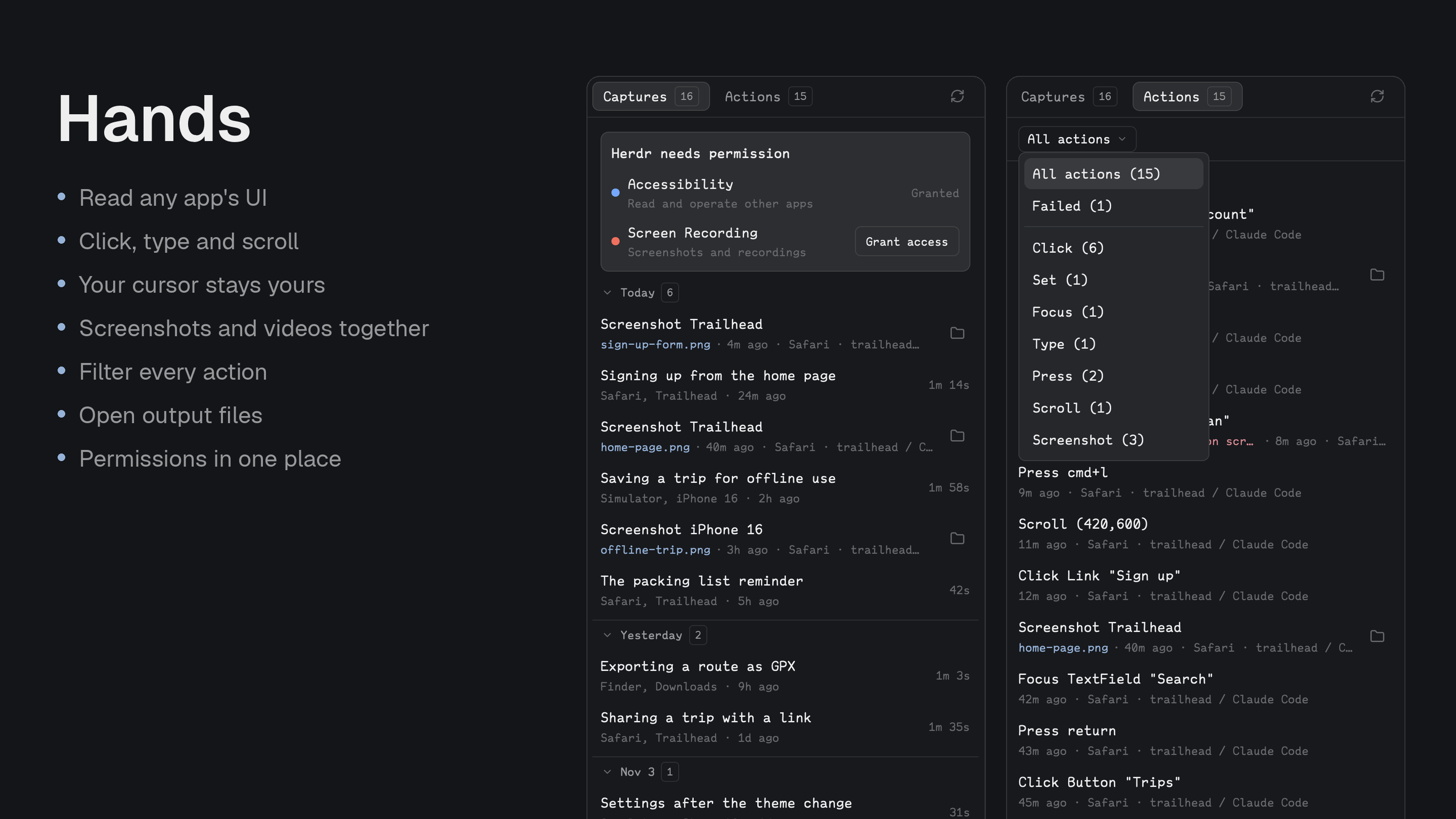
A hands command that lets a coding agent operate other Mac apps: list apps and windows, read an app's accessibility tree as numbered lines, click, type, press keys, set values, scroll, screenshot a window and record the screen. A pane shows its screenshots and recordings, what it did, and whether Herdr has the permissions it needs.
Quick start
- Install with the prompt below, open the Hands pane, and press Grant access for Accessibility and Screen Recording.
- In a Herdr terminal, try
hands see --app Finderto print Finder's elements as numbered lines. - Ask an agent to do something in another app. The Actions tab lists what it did, and Captures holds its screenshots and recordings.
Install
Read ~/.config/herdr-app/AGENTS.md, then add this mod: https://github.com/munza/herdr-mods/tree/main/handsRequirements: macOS 14 or later, Herdr, Go 1.23+ to run the installer, and the Xcode command line tools (clang) to build the helper. No runtime dependencies, no daemon, no MCP server.
Permissions. macOS attributes a command-line tool to the app that launched it. Run from a Herdr terminal, hands is attributed to Herdr, so you grant Accessibility and Screen Recording to Herdr once and every agent in a Herdr terminal has them. Run hands permissions --ask from a Herdr terminal, allow Herdr in System Settings › Privacy & Security, and restart the terminal. With Accessibility, anything in a Herdr terminal can read and operate every app's UI; with Screen Recording it can capture any window. The agent says this before installing. Treat agents that use hands like a person at your keyboard.
Install by hand
To install by hand, from the hands folder:
go -C helper run ./install
# Later, update an existing installation owned by this package:
go -C helper run ./install --update
The installer builds the helper, copies only mods/hands/ and the binary to ~/.config/herdr-app/mods/hands/, runs herdr-app check, and symlinks the binary to ~/.local/bin/hands so agents find it on PATH (--link-dir changes that; a real file there is left alone). It doesn't edit layouts or keys.
The manifest has place: none. To show the pane, add a block to a layout you own, for example in the panel stack. The CLI works without it.
{ "id": "hands", "type": "block", "content": { "mod": "hands" } }
No key binding ships with it.
Use
- Permissions block: while a permission is missing, the pane lists Accessibility and Screen Recording, each with a Grant access button that prompts for it and, if macOS shows no prompt, opens its place in System Settings. It goes away once both are granted.
- Captures tab: screenshots and recordings together, newest first, in collapsible days. Cmd-click a screenshot to open it, or press the folder button to show it in Finder.
- Recordings: rows show their length. Select one to see its note, what it recorded and when, the movie with its size (Cmd-click opens it), and the actions taken during it.
- Actions tab: what
handsdid or failed to do: the action and what it touched, any output file or the error in red, the app, the Herdr terminal that asked, and when. A menu filters by kind of action, or to failures. - Footer: shows whether a recording is running.
- Your cursor stays yours: events go to the target process, not the system, so your cursor and keyboard focus are never taken.
- Privacy of the log: the action history records what was touched, never the text typed or set. Reading commands such as
seearen't listed.
Settings
Change them in Better Config or in ~/.config/herdr-app/mods/hands/mod.json under "settings". Both the CLI and the pane read them. The CLI finds the file beside its own binary, so a copy of the binary elsewhere uses built-in defaults.
| Key | Default | What it does |
|---|---|---|
pause.after_action | 500ms | The wait before an action command returns. --delay overrides it for one call. |
pause.between_keys | 100ms | The pause between typed characters. --key-delay overrides it for one call. |
see.max_lines | 300 | The most elements a listing shows. --max overrides it. |
see.max_depth | 60 | How deep a listing goes. --depth overrides it. |
record.frames_per_second | 30 | Frames per second for window recordings (1–60). |
pane.refresh | 5s | How often the pane checks for new captures and actions (never closer than 1s). |
state_dir | ~/Library/Caches/hands | Where snapshots and recordings are kept. The HANDS_STATE_DIR environment variable wins over it. |
Update
Run go -C helper run ./install --update from the hands folder. Your settings block is kept.
For developers
The hands CLI. hands --help is the source of truth. The commands:
hands apps                                   running apps: pid, name, bundle id, frontmost
hands windows [--app Safari]                 on-screen windows with frames
hands see --app Safari [--window "Docs"] [--find Search] [--max 300] [--depth 60] [--menus]
hands click 12 | hands click 12 --right | hands click 12 --double | hands click --at X,Y
hands set 7 "text" | hands focus 7
hands type "text" [--app Safari] | hands key cmd+l [--app Safari]
hands scroll 3 --dy -5 | hands scroll --at X,Y --dy 10 --dx 0
hands shot --app Safari [--window "Docs"] out.png
hands record start demo.mov [--seconds 30] [--clicks] [--note "what this shows"] | hands record start demo.mov --app Safari [--window "Docs"]
hands record stop | hands record status | hands record list
hands actions
hands permissions [--ask[=accessibility|screen]]
--apptakes a name, bundle id or pid, matched exactly first and by prefix second. Every command takes--json.seeprints one numbered element per line with role, title, value and frame, and saves a snapshot. Element numbers refer to the lastseein that terminal; other terminals keep their own. If an element changed since the listing, the action does nothing and says so: runseeagain.- Actions use the Accessibility API and fall back to synthetic mouse or keyboard events when an element has no action.
click,set,focus,key,scrollandtypewait 500 ms before returning;--delay 100shortens that,--delay 0removes it. - Prefer
hands set N "text"for text fields: it writes the value in one step.hands typesends keystrokes to whatever is focused, using the active keyboard layout. hands keyunderstandscmd,shift,ctrl,alt/option,fn, letters, digits, punctuation,enter,tab,space,esc,backspace, arrows,home,end,pageup,pagedownandf1–f15.- Frames are global screen points with the origin at the top left of the main display. The menu bar is skipped unless
--menusis given; usehands keyfor menu shortcuts. - Recording without
--appcaptures the whole screen throughscreencapture(--clickshighlights clicks). With--appit records one window as H.264 at up to 30 fps, even when the window moves or is covered. One recording at a time;--secondsis a safety limit. hands actionsprints the last 200 actions and the last 200 screenshots, fromactions.jsonlin the state folder.hands record listprints the last 50 recordings, fromrecordings.json.
The agent skill. hands/SKILL.md tells an agent when to reach for hands (only when a visible app must be driven and no shell command, file, API or CLI can do it) and how to work in the see → act → see loop: list, act on a number, list again, since numbers go stale as soon as the UI changes. It also tells the agent to give recordings a --note, to say what it's about to do in another app, and to stop at dialogs asking for passwords, payments or deletions. Install it with your usual skills tool:
skills add munza/herdr-mods hands
Work on the mod
helper/bridge.m: the Accessibility, CGEvent and ScreenCaptureKit calls, returning JSON.helper/main.go: the command line;tree.gothe numbered listing and snapshot;keys.gothe chord table;record.gothe recorder;actions.gothe action log.helper/install/: the installer.mods/hands/main.js: the pane, which reads the CLI and holds its state;views/draws the permissions block, captures and actions, with the shared look inviews/ui.js.mod.schema.json: settings and defaults, which must matchDEFAULT_SETTINGSin the code.
(cd helper && go test ./... && go vet ./...)
node --test tests/*.test.cjs
herdr-app check "$HOME/.config/herdr-app/mods/hands"
Tests cover the Go logic and the pane; the Objective-C is exercised by hand from a Herdr terminal.