Factory
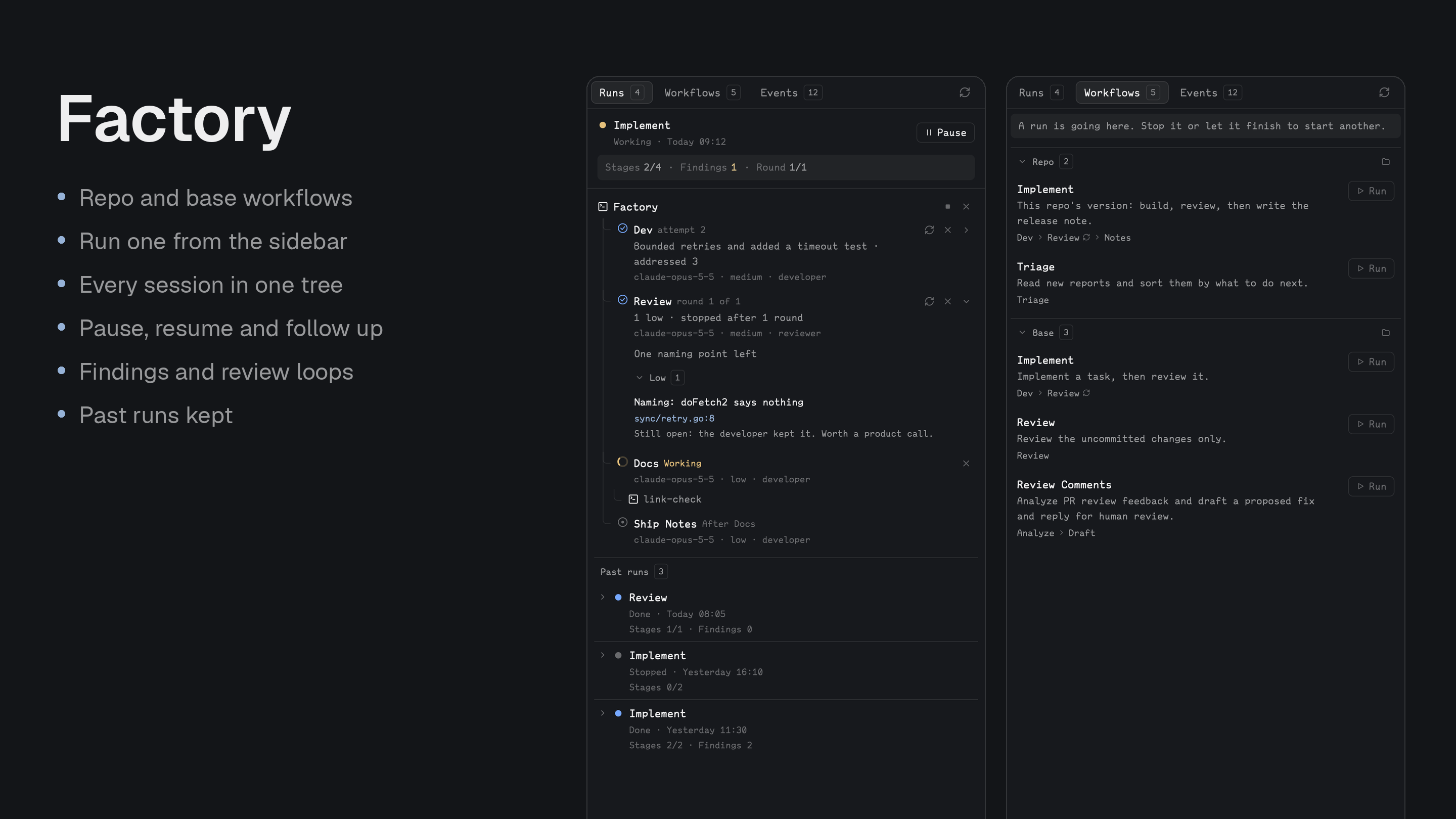
Staged agent runs. A Claude Code session orchestrates a named workflow, such as developer then reviewer, and a sidebar shows the run with every stage session nested under it. For people who direct agents and want to see where a run stands and redirect it.
Quick start
- Install with the prompt below. It also installs the
/factoryskill for Claude Code. - Ask a Claude Code agent:
/factory implement <task>, or press Run in the Workflows tab. - Watch the Runs tab: a developer stage, then a reviewer that loops back with findings. Write a follow-up on any finished stage.
Install
Read ~/.config/herdr-app/AGENTS.md, then add this mod: https://github.com/munza/herdr-mods/tree/main/factoryRequirements: Herdr, Go 1.23+ to run the installer and build the helper, herdr-core (hc), and Claude Code. Another agent can orchestrate by following the installed skill file. Stages can also run the Codex CLI.
Before installing, the agent explains that Factory starts and ends agent sessions and sends them messages, on a /factory command or a click on a stage. The default dev stage uses --permission-mode acceptEdits, so it edits files in the repo without asking; remove that from args to be asked. Every Claude stage may run hc send and write under .herdr-factory/ without asking, so it can report.
Install by hand
To install by hand, from the factory folder:
go -C helper run ./install          # first install
go -C helper run ./install --update # later
The installer builds the helper, copies mods/factory/ to ~/.config/herdr-app/mods/factory/, runs herdr-app check, writes the default workflows and templates if missing, and installs the /factory skill to ~/.claude/skills/factory/ unless a different skill is there. It doesn't edit layouts or keys.
The manifest has place: none, so add the sidebar to a layout you own:
{ "id": "factory", "type": "block", "content": { "mod": "factory" } }
With Better Tabs, a button can open it (target is that block's layout ID):
{
  "id": "factory",
  "label": "Factory",
  "icon": "mods/factory/icons/factory.svg",
  "action": { "type": "panel", "container": "panel", "stack": "panel-body", "target": "factory" }
}
No key binding ships with it.
Use
- Start a run: press Run in the Workflows tab, enter the task, and pick a new Claude session in its own tab or one already running in this folder. Or ask an agent:
/factory implement <task>. With no task, it takes the task from the agent's own conversation and asks if there's no clear one. The orchestrator never blocks, so you can keep talking to it. - Runs tab: a working or paused run is pinned at the top with its controls; finished runs are listed below, newest first. Each shows a strip with stages done, findings open and the loop's round, then a tree: Factory (the orchestrator) at the root, each stage under it, and any helper a stage started with
hc rununder that stage. Click any of them to open its session. - Each stage: shows its state (working, needs you, session ended, done, failed, stopped, queued), its result, and its model, effort and role. A chevron opens a done stage's result, with findings grouped by severity and the replies.
- Follow up: from a done stage's result, write what you want next. It goes to that stage's live session, which keeps its context, and the stages after it run again.
- Pause / Resume: Pause interrupts working stages and starts nothing new. Resume tells them to carry on. Resume needs a live orchestrator.
- Stop all (■) and Close (×) on the Factory row: after you confirm, Stop all interrupts working stages and keeps their sessions; Close ends every stage session. Factory's own session stays.
/factory continuepicks a stopped run back up. - Run again (↻) and Close (×) on a stage: Run again resends the stage its message, in the same session if it's alive, and queues the stages after it. Close ends that session, asking first if it's working.
- Workflows tab: everything this repo can run, in Repo and Base groups, each with a folder icon that opens where its
workflow.jsonlives. Hover a stage for its model, effort and role. - Events tab: the run's log, newest first, grouped by day, filterable by stage.
- Privacy: the sidebar never shows a task or follow-up. To read what a stage was told, open its session.
- Limits: a space on another machine shows a notice instead of the run. Closing a stage doesn't start the next one: use
/factory continueor Run again.
Settings
Change them in Better Config or in ~/.config/herdr-app/mods/factory/mod.json under "settings". Workflows are configured separately; see For developers.
| Key | Default | What it does |
|---|---|---|
refresh.run | 1500ms | How often a visible sidebar rereads the run file, never closer than 500ms. A hidden sidebar reads nothing. |
Update
Run go -C helper run ./install --update from the factory folder. Your settings block is kept, and your workflows and templates in ~/.config/herdr-mods/factory/ are never overwritten.
For developers
Workflow config
Everything lives in ~/.config/herdr-mods/factory/, created on first use and never overwritten:
~/.config/herdr-mods/factory/
  workflow.json
  templates/developer.md, reviewer.md, pr-analyst.md, pr-responder.md
The defaults are implement (dev, then review in a loop), review (review the uncommitted changes) and review-comments (analyze PR review feedback, then draft a fix and reply for you to review). workflow.json names your workflows:
{
  "workflows": {
    "implement": {
      "description": "Implement a task, then review it.",
      "stages": [
        { "id": "dev", "role": "developer", "agent": "claude", "model": "claude-opus-5-5", "effort": "medium", "args": ["--permission-mode", "acceptEdits"] },
        { "id": "review", "role": "reviewer", "agent": "claude", "model": "claude-opus-5-5", "effort": "medium", "after": ["dev"], "loop": { "with": "dev", "max": 3 } }
      ]
    }
  }
}
| Stage key | Default | What it does |
|---|---|---|
id | The name shown in the sidebar: 1–24 of a-z 0-9 - _. Stages run in file order. | |
role | A template in templates/, without .md. | |
agent | claude | claude or codex. |
model, effort | claude-opus-5-5 | Launch settings; the sidebar shows the model. Effort is low, medium, high, xhigh or max, and the model must support it. |
args | Extra arguments for the agent's command line. | |
message | First message, with {task} replaced by the task. Without it a reviewer is told to review the uncommitted changes for the task, and any other role gets the task itself. | |
after | Shown in the sidebar while the stage waits. | |
loop | {"with": "<earlier stage>", "max": <rounds>}; see Loops. | |
session | new | new starts a fresh session each run. reuse keeps the last run's live session for the same stage id if its agent, role, model, effort and args are unchanged. |
A workflow in your home file can also set extra_args, for a new Claude session the Run button starts. A session already running, or one you start yourself with /factory, keeps the flags it has.
"implement": { "extra_args": ["--permission-mode", "auto"], "stages": [ ... ] }
A repo can add workflows in .herdr-factory/workflow.json, in the same format. If it uses a name your home config also has, the plain name runs the repo's and base:<name> runs yours. A git worktree with no such file reads the main checkout's. A repo file can't set args or extra_args, so a cloned repo can't choose flags such as one that skips permission prompts: a repo stage takes the args of your stage with the same id in your workflow of the same name, and a repo workflow takes that workflow's extra_args.
Loops
{ "id": "review", "role": "reviewer", "loop": { "with": "dev", "max": 3 } }
When review reports findings, the live dev session gets them, pointing at the result file, then the live review session checks again. This stops when there are no findings or after max rounds, and only then does the run move on. A follow-up or rerun gives a loop its rounds back. with must name an earlier stage.
Follow-ups
Use Follow up on a done stage, or ask the orchestrator, such as /factory fix the review findings. It runs factory followup <stage> "<task>", which reopens the run, even a finished one, and queues the stages after it. A new session starts only if the stage's is gone. A follow-up waits until no stage is running.
Stage permissions
Needs you on a Claude stage usually means a permission prompt, which only you can answer. args in your workflow.json sets what a stage may do without asking:
"args": ["--permission-mode", "acceptEdits", "--allowedTools=Bash(go test:*) Bash(git diff:*) Bash(git status)"]
Keep the = form for --allowedTools. A list you allow runs unattended, so keep it to what the stage needs. The first message goes on the agent's command line, so a trust dialog also shows as Needs you until you answer it.
Add a role
A role is a Markdown file in templates/, whose body becomes the agent's standing instructions:
---
name: scholar
description: Answers a question and writes the answer as a cited note.
---
You are the scholar in a workflow. ...
Each role follows the result contract, which is how the orchestrator and the sidebar learn what happened:
- When its message says so, write
.herdr-factory/<stage>-<attempt>.jsonwith{"summary": "<at most ten words>"}. - A reviewer adds
"findings": [{"id", "severity": "critical|high|medium|low", "file", "line", "title", "detail"}]. An empty list means approved. - A developer answering findings adds
"replies": {"<finding id>": "<what it did>"}. - Then report as the message asks, with one
hc sendline, and stop.
The factory command
The orchestrator and the sidebar both call it, and it's the only writer of .herdr-factory/run.json. Run it from the repo root as ~/.config/herdr-app/mods/factory/bin/factory; factory help lists:
factory list [--json]                 workflows available here
factory status [--json]               the run
factory history                       past runs, newest first, as JSON
factory run <workflow> "<task>"       begin a run; this terminal is the orchestrator
factory continue                      pick a stopped or abandoned run back up, as orchestrator
factory start <stage>                 send a stage its message (attempt +1), reusing a live session
factory next                          start the next unfinished stage, or finish the run
factory stage <stage> done            read the stage's result file and record it
factory stage <stage> failed|working|stopped
factory rerun <stage>                 start it again and queue the stages after it
factory followup <stage> "<task>"     give it new work in its live session, reopening the run
factory close <stage>                 end its session
factory pause                         interrupt working stages and start nothing new
factory resume                        carry on a paused run
factory stop [--keep] [--orchestrator]
                                      stop the run and end every stage session; --keep interrupts them instead
factory done|stopped|failed           the run ended
factory event "<text>"                a free note in the log
factory tools [--json]                programs this needs that are not on PATH
factory init                          write the default config and templates if missing
The orchestrator's tab is named Factory and each stage session takes its stage's name, such as dev; if another repo has a live dev, this one becomes dev-2, since hc names must be unique. One run goes at a time per repo, and a new run ends the last run's sessions, apart from reuse stages. .herdr-factory/ ignores itself in git, and a new run moves the last run and its result files to .herdr-factory/runs/. Past runs aren't pruned; deleting that folder only loses the history.
The /factory skill
factory/skills/factory/SKILL.md, installed to ~/.claude/skills/factory/, turns a Claude Code session into the orchestrator. It starts each stage with factory run and factory next, then ends its turn instead of waiting; each stage reports back with hc send, and the orchestrator records it with factory stage <id> done and moves on. It never implements or reviews anything itself. What you can say to it:
/factory <name> [task], or/factory base:<name> <task>for your home version of a workflow the repo also defines./factory help: lists the workflows here and what it can do./factory continue: picks up a run that stopped, failed or lost its orchestrator, keeping stages already done.- "pause", "resume", "stop" (interrupt, keep sessions), "close all", "rerun <id>", "close <id>", "status", or "<work> in <id>" for a follow-up.
- "add a docs stage to implement": changes this project's
.herdr-factory/workflow.json(the main checkout's from a worktree) unless you say it's for every project, leaves outargsandextra_args, writes a template for a new role, and checks the file withfactory list. The change applies from the next run.
The sidebar also has a factory.refresh command that rereads the run.
Work on the mod
mods/factory/main.js: the sidebar, and a map of what's where.run/:model.js(what a run's record means) andreads.js.actions/: starts and changes things through the helper (commands.js,menus.js).views/: drawing, with the shared look inviews/ui.js;icons/.mod.schema.json: settings and defaults, which must matchDEFAULT_SETTINGSin the code.helper/: thefactorycommand (main.go,run.go,config.go,session.go), withinstall/for the installer anddefaults/for the workflows and templates it writes.skills/factory/SKILL.md: the orchestrator skill.
node --test tests/*.test.cjs
(cd helper && go test ./... && go vet ./...)
herdr-app check "$HOME/.config/herdr-app/mods/factory"
Tests use stand-ins for Herdr and hc, and herdr-app check draws only the empty state, so also look at the running app.